

Skip to content

Posture check for the trainer

Your bike fit, checked on every ride.

WattPose uses your iPhone camera to measure your back angle, knee extension and head position while you ride. You check for yourself whether you hold your position through long sessions, and see the minute your posture starts to slip.

  • Free, no subscription
  • No account
  • Camera images stay on the device
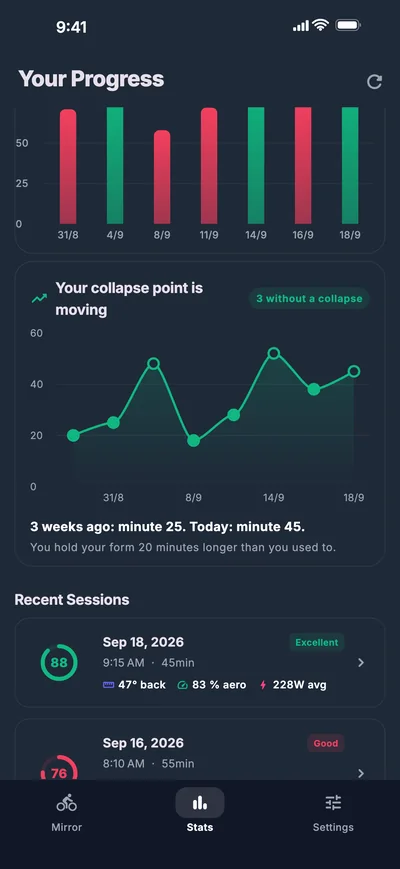
Collapse point over three weeks: from minute 25 to minute 45
Back angle and power on one timeline
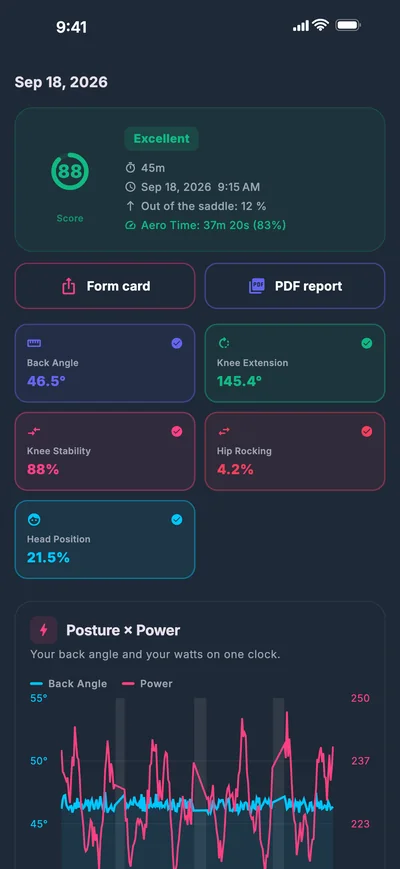
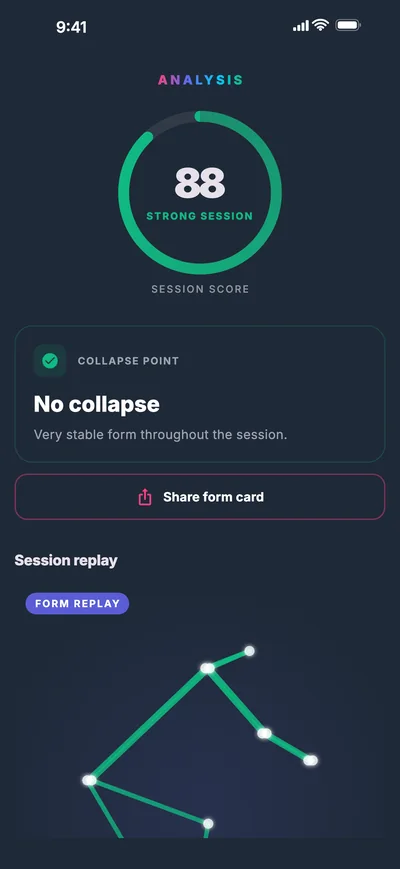
Post-ride analysis with session score 88 and skeleton replay

Sample session

Back angle
46.5°
Knee extension
145.4°
Aero time
83 %
Out of saddle
12 %

What it measures

Six posture metrics, straight from the camera image.

Pose detection finds 33 body landmarks in every frame. WattPose turns them into the angles and distances a bike fit looks at too.

Side view of a cyclist skeleton with a back angle of 46.5 degrees from verticalVERTICALBACK ANGLE46.5°KNEE EXTENSIONHEAD POSITION
Skeleton from the app's demo session, drawn to scale.

Camera from the side

Back angle
Torso lean, measured from the vertical at the hip.
Knee extension
Knee angle at the bottom of the stroke. Shows whether your saddle height fits.
Head position
How far your head drops as you tire.

Camera from the front

Knee stability
Whether your knee tracks straight over the pedal or drifts inward.
Shoulder symmetry
Whether both shoulders stay level.
Hip rocking
How far your hips shift sideways as you pedal.
  • If the camera is tilted or too close, WattPose shows no number rather than a wrong one.
  • Out of the saddle, posture metrics pause, because they only apply when seated.

While you ride

Cues you get without looking at the screen.

Mid-interval you won't look at your iPhone. So WattPose tells you by voice when your posture leaves its target range.

  • Voice coach

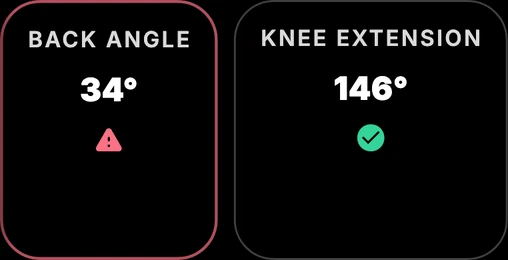
    A short cue when your back angle, knee or head leaves the target range. On screen, the metric turns red.

  • Out-of-saddle detection

    When you stand up, WattPose sees the hip rise and pauses posture metrics. At the end you see your out-of-saddle share.

  • Ghost overlay

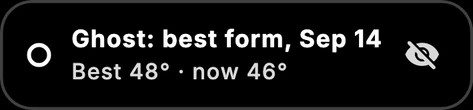
    The skeleton of your best session sits semi-transparent over the live image, so you see at once whether you sit more upright today.

Live

Warning: adjust your torso angle, aim for a 45 to 55 degree forward leanBack angle 34 degrees with warning icon, knee extension 146 degrees fineOut of the saddle: posture paused, share 12 percentGhost: best form from 14 September, 48 degrees, now 46 degrees
Original elements from the app's live view

After the ride

Every session becomes a posture log.

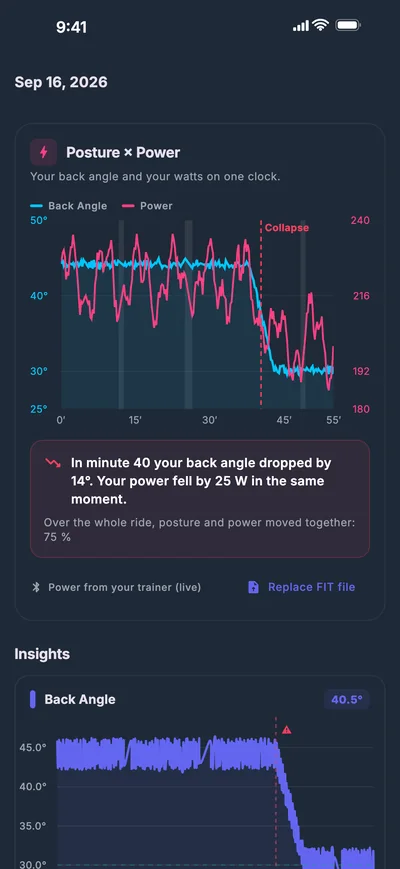
Chart of back angle and power with the collapse at minute 40 marked

Posture × powerNew

See what your posture costs you.

WattPose puts your back angle and your power on one timeline and sums up what happened.

From the app
“In minute 40 your back angle dropped by 14°. Your power fell by 25 W in the same moment.”
  • Power live from your smart trainer over Bluetooth (FTMS or Cycling Power)
  • Or after the ride from a FIT file, for example from Zwift
Line chart: the collapse point moves from minute 25 to minute 45 over three weeks

Collapse point

Hold your form longer. Week after week.

WattPose finds the minute your posture broke down. Over several weeks you watch that point move later.

From the app
“3 weeks ago: minute 25. Today: minute 45.”
  • Trend across all sessions, including rides without a collapse
  • A matching exercise for your weakest spot, such as plank or clamshells
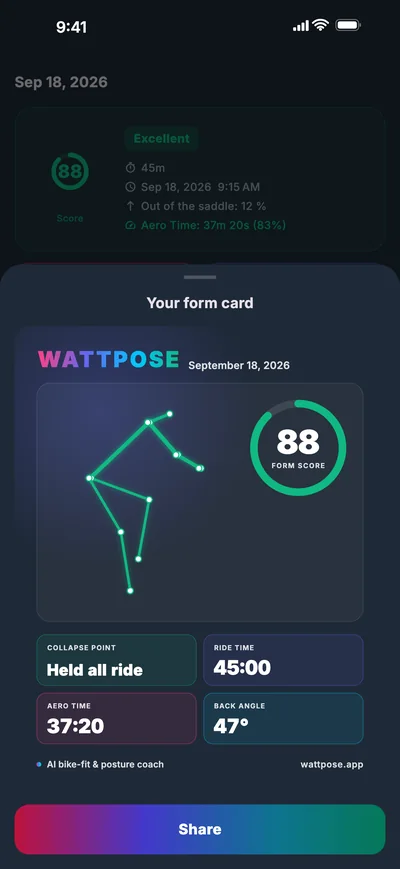
Form card with the WattPose logo, skeleton and form score 88

Share

Your form, ready for Strava and Instagram.

The form card puts score, skeleton, aero time and collapse point on one image. You also get a 10-second highlight of your skeleton as a video.

  • Share from the iOS share sheet
  • Video as MP4, ready for Strava

Bike-fit report

Take it to your bike fitter.

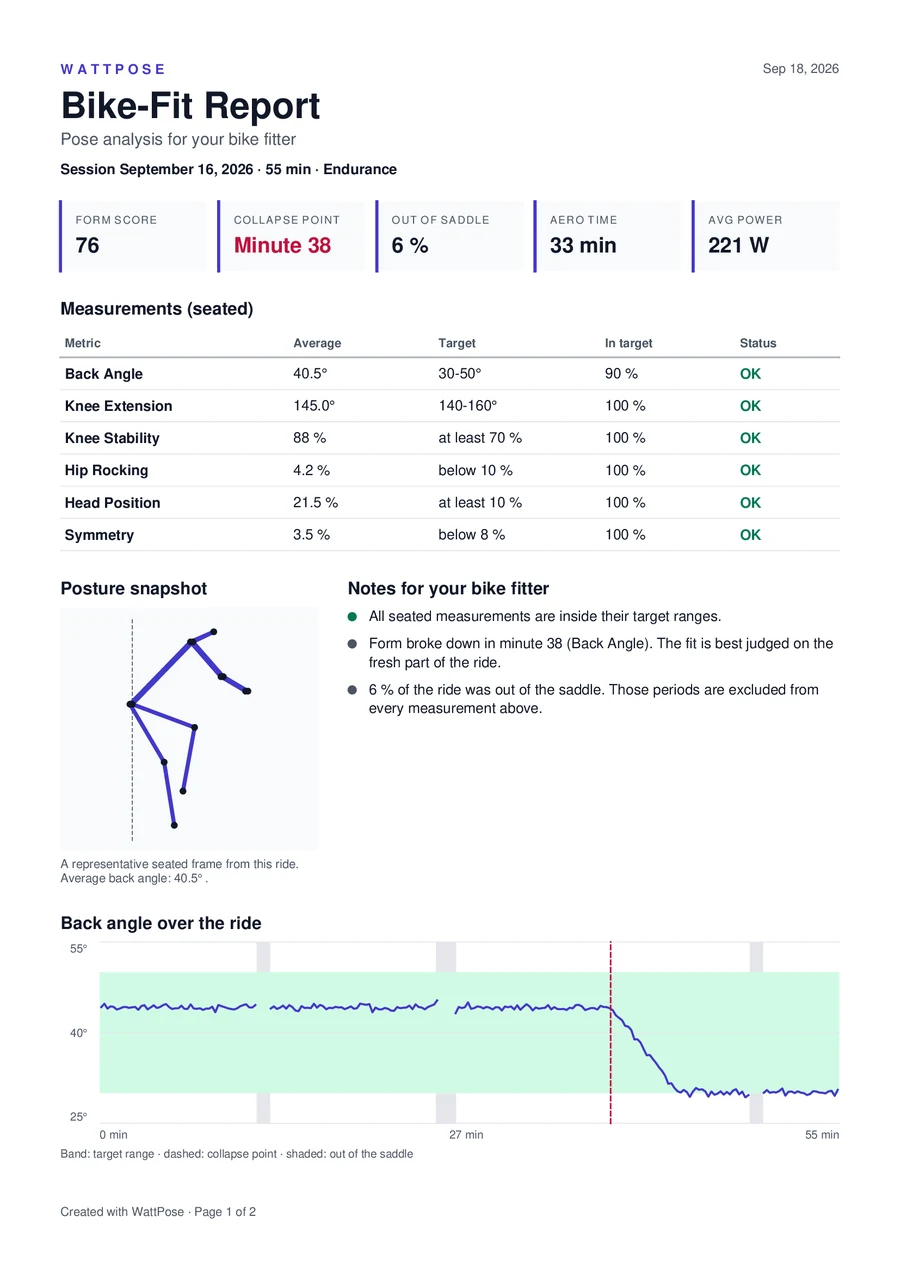
From every session WattPose creates a PDF report. It holds your seated metrics with target ranges, a posture snapshot, your back angle across the whole ride and notes for your fitter.

A professional bike fit remains the foundation of your position. WattPose is an extra tool for checking yourself: you see whether you hold the position you were set up in, and you bring your fitter data from your own sessions.

Bike-fit report PDF: form score 76, collapse at minute 38, metrics table and back angle over time
Page 1 of a report created from the demo session

History

Every session stays on your iPhone.

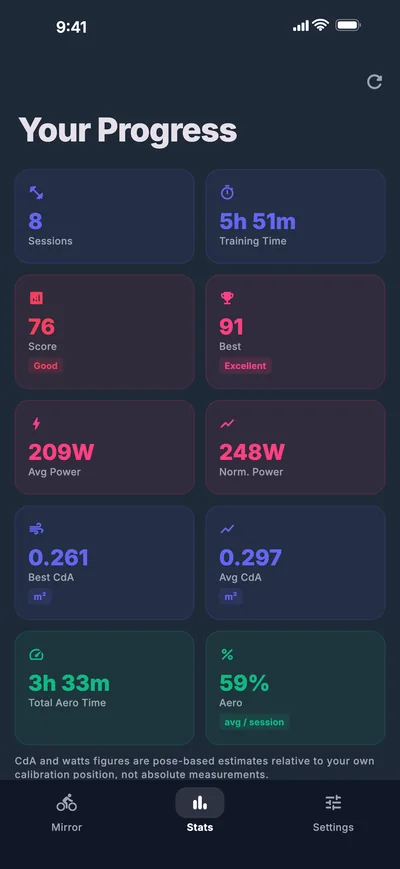
Form score, aero time, estimated CdA and power across all rides, with no account and no cloud.

CdA and power figures are estimates relative to your own calibration position, not wind-tunnel measurements.

Session details with score 88, back angle 46.5 degrees and knee extension 145.4 degrees
Session details
Statistics across 8 sessions with average score, power and CdA
All rides

How it works

Three steps to your first session.

  1. 1

    Set up

    Stand your iPhone upright about 2–3 m away: from the side for back and knees, from the front for knee stability and CdA.

  2. 2

    Calibrate

    Sit still for a few seconds. WattPose checks camera angle, distance and tilt before it measures.

  3. 3

    Ride and review

    Ride your workout as usual. Afterwards you get your score, collapse point, report and form card.

Privacy

Your rides belong to you.

Pose detection runs on the iPhone. Camera images are never stored or uploaded, and sessions live only in the app. There is no account and no cloud.

Read the privacy policy

FAQ

Questions and answers

Do I need a smart trainer?

No. Posture, collapse point, report and form card work with the camera alone. For posture × power, connect a trainer over Bluetooth or import a FIT file after the ride.

Which devices are supported?

iPhone and iPad. The exact system requirements are listed on the App Store.

How accurate are the numbers?

Angles are calculated from body landmarks that pose detection finds in the camera image. That is enough to see changes reliably within a ride and across weeks. Absolute values depend on camera position and clothing. If the camera is badly placed, WattPose shows no values.

Does it work outdoors?

WattPose is built for the indoor trainer. Camera and bike have to stay still for the measurement to hold.

What does WattPose cost?

Nothing. There are no in-app purchases and no subscription.

Does WattPose replace a bike fit?

No. Setting up your bike is the job of a professional bike fit. WattPose adds to it as a tool for checking yourself: between appointments you see whether you hold your position, and you can take the bike-fit report to your fitter.

What data leaves my iPhone?

Camera images and posture data do not. According to Google, ML Kit, the library behind pose detection, sends technical usage and performance data such as device type and processing time. Sharing and bug reports only happen when you start them.

Try it on the trainer tonight.

Free, no account, set up in a few minutes.

Free on the App Store